
Let's Train a Pretend Baby Chatbot!

Updated: Sep 16
A Screen-Free Activity for Kids’ AI Digital Literacy
If your kids are doing internet searches, they are already interacting with AI. Are you giving them the critical thinking tools they need to interact with AI safely and wisely?
The activity below is a screen-free, fun way for kids to build those critical thinking skills. Specifically, there are 3 teaching goals for this AI digital literacy activity:
Teach kids how AI chatbots learn by training with data.
Get kids to think about whether AI chatbots have real feelings or not.
Get kids to think about the limitations of what an AI chatbot actually knows, and doesn’t.
I heavily based this activity on “Let’s Generate a Sentence” from the Data Education in Schools program, but I modified it for elementary age children at home or in a classroom.
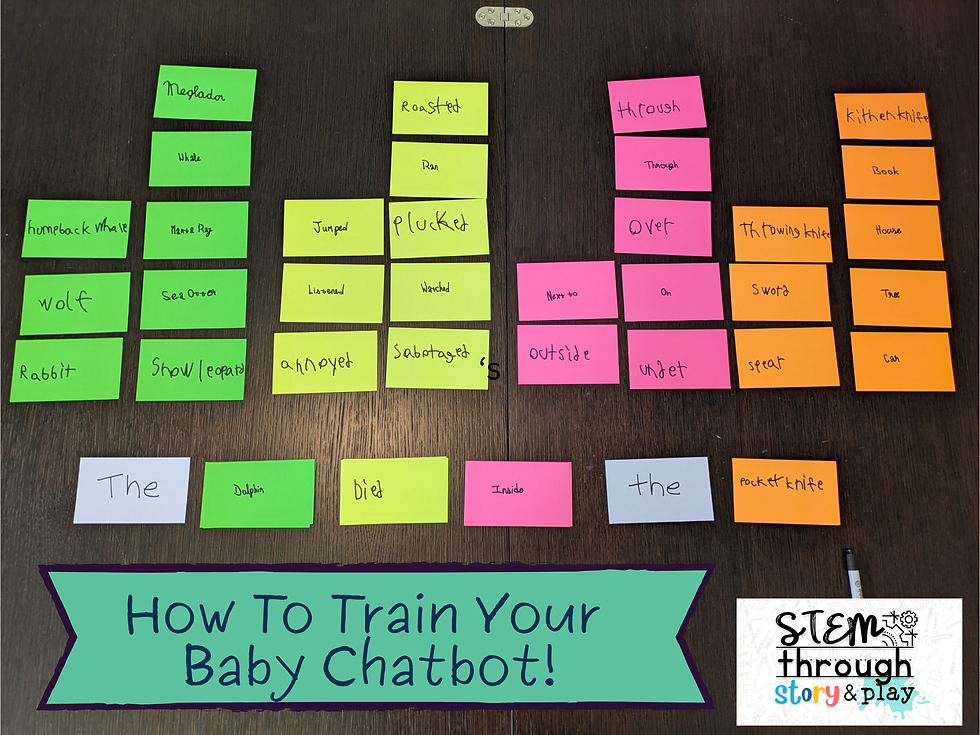
Requirements:
Kid(s) who are old enough to play Mad Libs. Ideally they can independently write words.
Sticky notes, ideally in 4 different colors.
Someone or something to role play as the Baby Chatbot. This could be a child, a grown-up, a puppet or toy. Ideally this is not the same person who is running the activity.
Your imagination!
Step 1: Introduce Baby Chatbot.
Explain that Baby Chatbot doesn’t know very much right now, so we’re going to give her some data to learn. First, we’re going to give her different kinds of words to learn.
Step 2: Train the Baby Chatbot to learn animal names.
Ask everyone to write down an animal name on a sticky note. (If you are doing this with only 1-2 kids, each person including you will need to write several sticky notes. Duplicates are encouraged! If your kid just wants to write 5 sticky notes that all say “cat”, let them.) You should end up with a bunch of sticky notes of animal names. Hopefully there are some duplicate animal names in the bunch.

Step 3: Train the Baby Chatbot to learn verbs.
Now ask everyone to write down a past test verb on a sticky note. For example “jumped”, or “flew.” (Again, if you only have 1-2 kids participating, each person including you should write several verbs on separate sticky notes. Duplicates are encouraged!)

Step 4: Train the Baby Chatbot to learn prepositions.
Now ask everyone to write down a preposition on a sticky note. For example “on”, “through”, or “under.” (Again, if you only have 1-2 kids participating, each person including you should write several prepositions on separate sticky notes. Duplicates are encouraged!)

Step 5: Train the Baby Chatbot to learn objects.
Last training session! Ask everyone to write down an object name on a sticky note. For example “ball”, “house”, or “car.” (Again, if you only have 1-2 kids participating, each person including you should write several prepositions on separate sticky notes. Duplicates are encouraged!)

Step 6: Ask the Baby Chatbot to write you a sentence that goes "The [animal] [verb] [preposition] the [object]."
To build this sentence, have Baby Chatbot look through the animal name sticky notes, and pick the most popular animal name in the bunch. If there are ties (if you have 3 sticky notes that say “cat” and 3 sticky notes that say “dog”, for example), roll a dice or flip a coin to choose one.
Now have Baby Chatbot repeat this process to choose a verb, preposition, and object.
Put those sticky notes together to form your sentence. Congratulations, you’ve trained a Baby Chatbot!

When I did this activity with my kids, they trained their Baby Chatbot to generate the sentence: “The dolphin died inside the pocket knife.” (Please don’t judge me that these are the words that my kids came up with on their own! 😂)
Step 7: Talk with your kids about how Baby Chatbot is like a real AI chatbot in some ways.
Just like a real AI, Baby Chatbot is picking the most likely word based on the data it learned. Our Baby Chatbot picked “dolphin” as the animal, because that was the animal it saw the most in its training data.
Just like a real AI, Baby Chatbot only knows as much as it was taught. It doesn’t know of any other animals that you didn’t teach it.
Big takeaway #1: AI Chatbots learn by training with data.
Step 8: Talk with your kids about how Baby Chatbot is not quite as smart as a real AI chatbot.
The sentence that Baby Chatbot put together may or may not make much sense. This is because AI chatbots don't just learn individual words. They learn from whole books, articles, newspapers and magazines. That means they’re also learning which words usually go together in a sentence.
A real AI chatbot got trained on a lot of sentences where cats purr or pounce. The AI chatbot probably got trained on very few sentences where cats fly on an iceberg. This kind of learning helps them build sentences that usually make more sense than what our Baby Chatbot was able to do.
Step 9: Talk with your kids about whether Baby Chatbot has feelings.
Has Baby Chatbot ever felt happy when she heard a cat purr? No, of course not!
If you tell an AI Chatbot "My cat is sick," it might respond "I'm so sorry, your poor cat." It says this because it knows this is a common thing to say. But does the AI actually feel sorry for your cat? No!
Big takeaway #2: AI doesn’t feel, and it’s not your friend. It’s just a tool.
Step 10: Talk with your kids about what Baby Chatbot actually knows, and doesn’t know.
Ask the kids - Does Baby Chatbot know what a cat is? Does she know what a purr sounds like? If Baby Chatbot was given the sense “The cat rode on the dragon,” would Baby Chatbot know if that really happened or if it was just a pretend story?
Of course not! Baby Chatbot doesn’t know any of this, and neither do the AI Chatbots you might interact with.
AI Chatbots don’t know what the sentences they’re writing actually mean. They just know these are words that usually go together to form a sentence.
Big takeaway #3: In some ways AI knows a lot more than you. In other very important ways, AI knows a lot less than you.
This might be a great time to show your kids some real life examples of AI giving some pretty hilariously wrong answers in internet search results.


Older kids might enjoy these examples of even adults keep getting caught off guard when AI tools fail them spectacularly. Like the lawyer who thought ChatGPT “was, like, a super search engine,” and filed a court brief including references to court case precedents that had been completely made up by ChatGPT.
I created this activity as part of a series on AI for parents and teachers of young (elementary-age) kids. Check out the whole series here:
Talking AI with Kids
We’re all a little confused about AI right now. Let me help you and your kids make sense of it.

If this Chatbot roleplay activity helped you feel more empowered to teach young kids to think critically about AI, I hope you will share it with someone else!
And let me know in the comments if you’d like to see more critical thinking activities around AI!
Keep lighting sparks of curiosity,
Amy Wung Tsao
P.S. Sign up here to get my monthly emails with more play-based STEM for kids ideas!

Comments