
AI Digital Literary for Kids - Talking to Young Kids About AI Biases and Fakes

TLDR:
Teaching Kids How AI Training Data Limits What AI “Knows”
Watch How AI becomes biased, simply explained from Future with Fawzi to understand why bias in AI is inevitable.
Play Google’s Quick, Draw! Game
For older kids, play the AI Quest game
Teaching Kids About Spotting AI Fakes and Hallucinations
For younger kids, teach them to ask trusted grownups to help them tell fake from real.
For older kids, teach them these 4 tips from this Break the Fake poster to double-check whether something is true.
Play the Two Truths or AI? movie poster game (for ages 5-18) from Common Sense Media
With older kids (9+), play the Reality Check Game together to practice your fact-checking skills.
Keep reading to learn more!
AI Digital Literacy for Kids - Part 2

It's a weird, fast-changing world out there with AI technology, and that's why I want to make it as easy as possible for you to help your kids learn to be wise AI digital citizens.
Here's a fun way to start, by showing kids just how wrong AI can get:


Source: X.com via Popular Science’s “Google’s AI Overview tells you to eat glue. (Don’t.)”
OK, but how can AI know so much and yet still get some totally obvious things so wrong? Part of the answer lies in understanding how AI even knows anything, which I covered in Part 1 of this AI series.
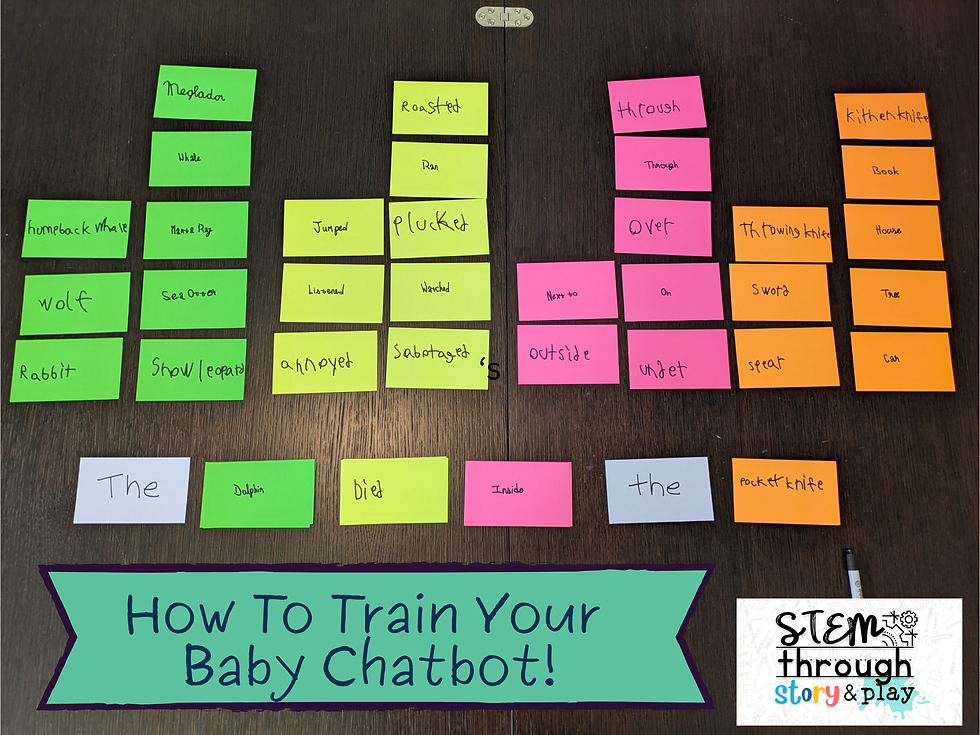
AI Digital Literacy for Kids - Part 1
Part 1 of this blog series includes AI resources for grown-ups and a kid-friendly screen-free activity to “train” a Baby Chatbot.
Here in part 2, we’ll go deeper into why AI can go wrong, and age-appropriate ways for kids to be smart digital citizens who aren’t easily fooled by an AI hallucination.
(Just a reminder - I am never paid to mention any of these resources; there are no affiliate links.)
Teaching Kids How AI Training Data Limits What AI “Knows”
Watch How AI becomes biased, simply explained from Future with Fawzi
Less than 2 minutes to understand why bias is inevitable in any AI! And made kid-friendly with lots of penguin analogies. Even kids can understand that if the only animal they’d ever seen was a penguin, they would think that was the only animal in the whole world.
Play the Quick, Draw! Game from Google
Let your kids play Quick, Draw, and see if the AI can guess what they’re doodling. It only takes a couple minutes to play a round of 6 doodles. Turn the sound on, because it’s pretty fun to hear the AI voice guessing out loud. “I see circle, or cup, or bread. Oh I know, it’s harp.”
Once you’ve completed 6 doodles, that’s the teaching moment to explore how this relatively simplistic AI works. First, click on each of your doodles, and see what other guesses the AI had. And you can scroll down to see a sample of other doodles of the same word. Talk with your kids about what patterns you think the AI picks up on.
Even more, you can click here to see lots and lots and lots of doodles that the AI was trained on! Here is a visual way to easily understand just how much data AIs need to “learn.” See if you can spot the same kind of patterns that the AI did. You can also watch the video above to learn how the AI is not just looking at the final doodle, but is also looking at the order of each stroke, and the direction of each stroke.
If you want to try to test the limits of what AI knows, you can try to draw something more abstractly, or draw it badly on purpose, or draw it wrong. For example, when I was told to draw a belt, I drew a stick figure with a belt, and drew an arrow to the belt. The computer voice eventually said “I have no idea!” and gave up. Turns out no one else has ever drawn a belt this way, I guess? This is a great interactive way to understand the limits of what AI does and doesn’t know.
A cool example I saw was that if you tried to draw a lightning bolt from the bottom to the top, the AI couldn’t recognize it. It would guess “zig zag” instead! If you look at all the doodles of lightning, you’ll notice they all started from top to bottom. So even if your lightning drawing looks just like another one, just changing the direction of your strokes confused the AI.


Play the AI Quest game with older kids from Google Research and Stanford Accelerator for Learning In this game, you help your alien friends “train” an AI. For example, players train a flood prediction AI to stop the aliens’ town market from flooding. First players find sensors and other data sources. (I found moving around to be a little tricky on my computer, but clicking and dragging worked ok.) Then players clean up bad data, like obvious typos in a rainfall chart. Finally they choose what data sources will be the most useful for the AI.
The point of the game is to teach kids that AI is not magic. It requires humans to choose wisely what data to use for training and to test it thoroughly. Even when you win, the game makes clear that your AI predictions are not 100% accurate. This game is made for middle schoolers, but younger kids can enjoy this game with some adult help.
Teaching Kids About Spotting AI Fakes and Hallucinations
So how can we spot when AI is wrong?
For younger kids in preschool or kindergarten, they’re probably not doing a lot of internet searches on their own. But they may see a video or picture at a friend’s house, or on a sibling’s screen. It’s still worth talking to these young ones about not jumping to believe everything. Make sure they know they can always come to you to help them tell fake from real!

For older kids, teach them these 4 tips from this Break the Fake poster to double-check whether something is true online. Print it out and display it near your computers. Then you can immediately put these four tips into practice with a couple of games:

Play the Two Truths or AI? movie poster game from Common Sense Media Kids can get really into this game, especially with the different difficulty levels and the optional timed challenge. They might know some of the movies already, which might help them answer the quiz. But be sure to point out how hard it would be to know which posters are real if you didn’t already know the movie! Practice using trusted sources, like maybe IMDB, to check if a movie poster is real or not.

With older kids (9+), play the Reality Check Game together to practice your fact-checking skills. from Media Smarts This game shows players a fake social media feed, with an eye-catching article. You can click around the article and find out details like the author’s contact information and what else they have written, whether the article is opinion or fact-based, and what information a reverse image search turns up. The scenarios are actually fairly nuanced rather than being super obvious, requiring kids to really clue in and think through the details before they decide whether the story is likely false or true!
You’ve got this. You and your kids are now better equipped to not get fooled in the age of AI.
That’s the end of my AI series, at least for now. If you have any more AI questions you’d like me to tackle, let me know in the comments!
Until next time, keep lighting sparks of curiosity!
Amy Wung Tsao


Comments